
The product
Your store.
Your account experience.
Replace Shopify’s customer account experience with one on your store. Choose how it looks, what’s included and what customers can do.
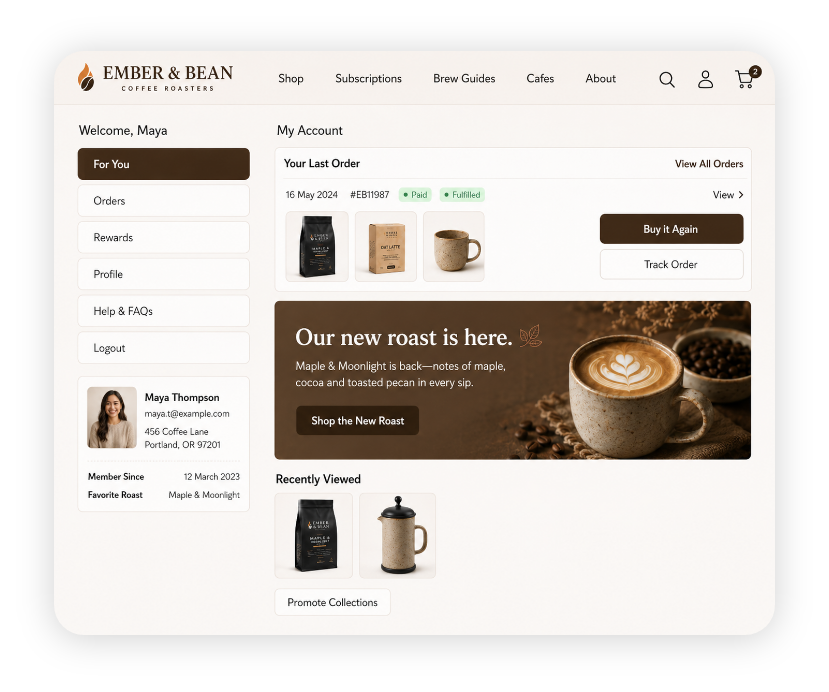
01 / On your store
Keep the account
on your store.
Your store’s navigation, your account content and a familiar place for customers to come back to.
02 / Order self-service
Make orders
easier to manage.
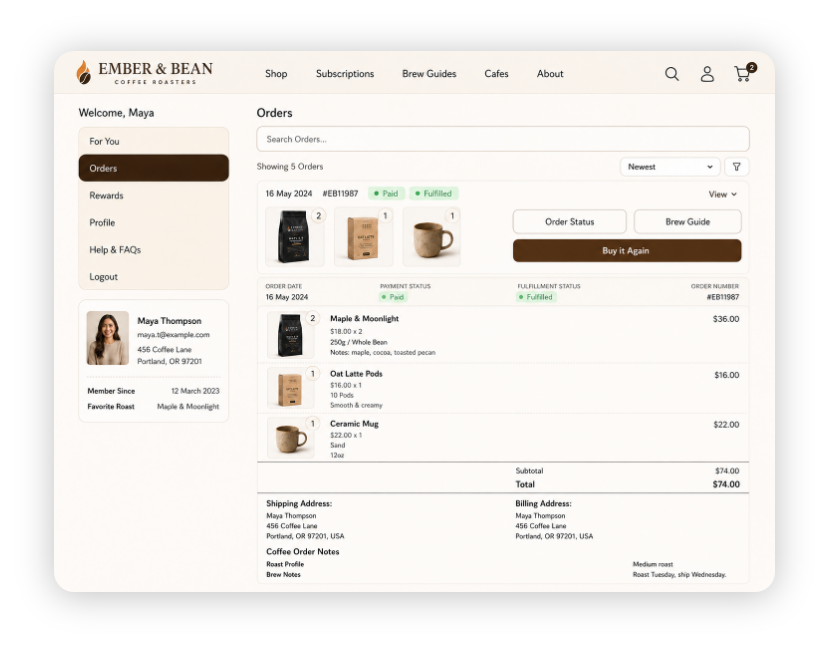
Give customers a useful place to find a purchase, check the details and follow available tracking.
- Search, sort and filter order history.
- See items, totals, addresses and order information.
- Find eligible payment, cancellation and return actions.
- Access documents and downloads through supported apps.
Available actions depend on your settings, order eligibility and connected apps.
03 / Repeat shopping
Make it easier
to buy again.
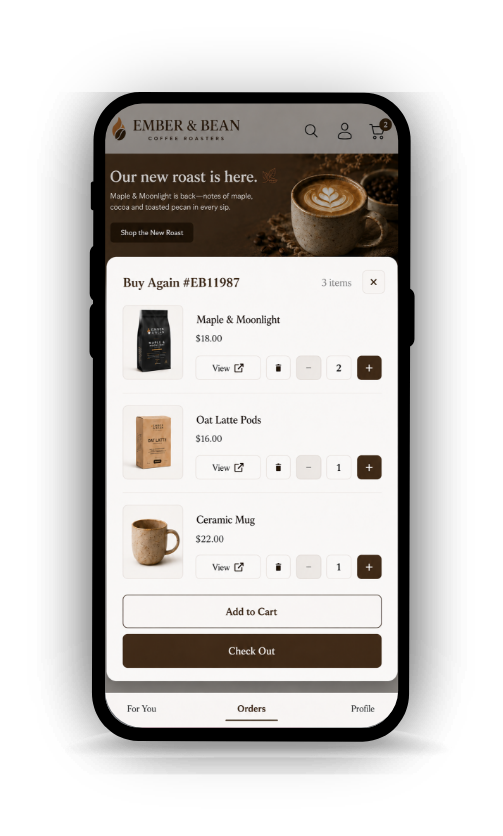
Customers can choose available products from a previous order and add them to their current cart.
Give them other useful ways back to products, too: recently viewed items, products saved from cart and available Shopify recommendations.
Try Buy Again in the demoCustomers choose what to add and still complete checkout. Buy Again does not place an order automatically.
04 / Customer details
Collect the details
your store needs.
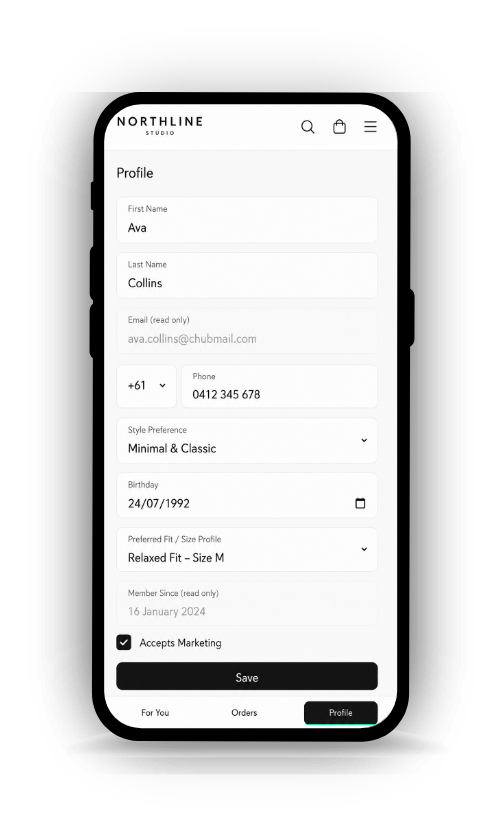
Go beyond a name and email. Add useful fields to profiles and registration, and let customers keep supported information up to date.
- Collect preferences and other relevant customer details.
- Choose supported field types and validation.
- Show fields conditionally, or keep values read-only.
- Offer address updates and applicable marketing preferences.
Custom customer fields use supported Shopify custom data. You control which fields customers can see and edit.
05 / Merchant control
Change the account
in the editor.
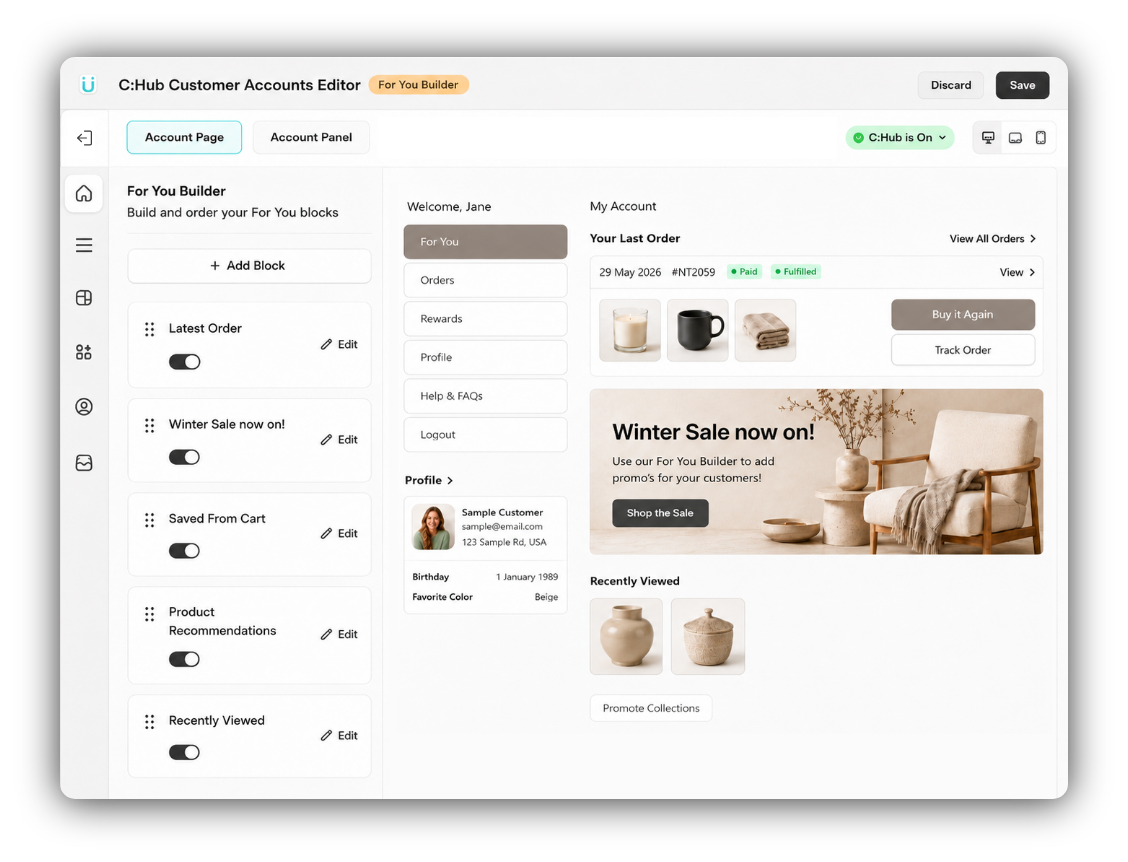
Arrange the menu. Add useful content. Choose fields and order actions. Adjust the account to suit your store, then preview your changes before saving.
Menus & content
Links, store pages, orders, product blocks and promotions.
Design & language
Colours, layout, labels and messages that suit your store.
Relevant information
Configured customer-tag visibility, announcements and field rules.
06 / Connected apps
Put the apps customers use
in their account.
Help customers find their supported subscriptions, rewards, invoices, returns and other services from the account they already use.
Some integrations appear inside the account. Others open a page or the connected app’s own interface.
See all integrationsConnected apps need their own installation and setup. Third-party fees may apply.




There’s more
you can configure.
The details matter. Explore the tools behind the account experience.
Accounts & design
- Account Page and Panel
- Use a dedicated account page, an optional slide-out panel, or both. Choose which content appears in each.
- Storefront navigation
- Give customers a route into C:Hub from your store’s account links. Shopify continues to handle sign-in.
- Menus and destinations
- Arrange account tools, custom links, Shopify pages, collections and supported apps. Choose the default account destination.
- Visual styling
- Adjust colours, typography, spacing and account layouts. Custom CSS is available for additional control.
- Live editor preview
- See changes in the Page and Panel preview as you edit, then save when you are ready.
Orders & self-service
- Order history and search
- Find purchases using search, sorting and payment or fulfilment filters.
- Order details
- Show items, totals, discounts, addresses and available tracking, with inline or separate order details.
- Custom order information
- Add supported order fields, document links and customer-facing tag badges.
- Payment and draft orders
- Offer payment links for eligible outstanding orders and show draft orders when enabled. Shopify handles payment.
- Cancellation and returns
- Offer cancellation within configured eligibility rules, and returns through a supported Shopify or returns-app setup.
- Documents, downloads and reviews
- Add supported provider actions to eligible orders. The connected app supplies the underlying service.
Repeat shopping
- Buy Again
- Let customers choose available products from an earlier order and add them to their current cart.
- Recently viewed
- Help customers return to products they browsed, when viewing history is available.
- Saved from cart
- Show products previously added to cart so customers can revisit them.
- Product recommendations
- Show related or complementary Shopify recommendations where configured and available.
- Collections and promotions
- Add useful collection links, product launches, offers and other account content.
Profiles & customer details
- Profile and address book
- Let customers update supported profile details, add or edit addresses and choose a default address.
- Custom customer fields
- Collect useful information using supported text, choice, number, date and file fields backed by Shopify custom data.
- Field rules
- Use supported validation, conditional display and read-only fields to control what customers see and edit.
- Registration forms
- Choose supported registration fields, labels and notices. Available controls depend on the Shopify account mode.
- Marketing preferences
- Let customers maintain applicable email and SMS preferences. SMS preferences require phone information.
- Profile Card
- Show selected customer information at a glance, separately from editable profile fields.
Content & languages
- For You account home
- Arrange recent orders, products, promotions and collection links into a useful first screen.
- Customer-tag visibility
- Show configured menu items, promos and announcements to matching customer tags. These are display rules, not access permissions.
- Announcements
- Add instructions or offers to relevant account screens, with link or copy-code actions.
- Editable language
- Edit account labels and messages, with up to five active account languages. Custom content may need its own translation.
Connected apps & reporting
- Supported integrations
- Connect supported loyalty, subscription, invoice, return, wishlist and other services. Provider installation, setup and fees may apply.
- Store credit
- Display available Shopify customer credit or provide account access where supported. C:Hub does not issue the credit.
- Account engagement
- See account logins and interactions with orders, profiles, products and other account tools.
- Purchase and service signals
- Understand feature interactions. These signals do not measure completed sales or prevented support tickets.
Features depend on your account setup, configuration and available data. Engagement reports show feature use, not attributed sales or prevented support tickets.
A few practical details.
Does C:Hub replace Shopify customer accounts?
C:Hub replaces the customer-facing account experience on your storefront. Shopify still handles sign-in and stores your customer and order data. C:Hub works with Shopify’s new and classic customer accounts.
Do I need both the account page and panel?
No. Enable the page, the optional slide-out panel, or both. Choose the content and navigation that suit each experience.
Will every action stay inside my store?
The account Page and Panel are on your storefront. Shopify sign-in, payment and some connected services may use their own pages. Some integrations appear inside the account; others open a page or another app’s interface.
Can every order be cancelled or returned?
No. Cancellation depends on your settings and the order’s eligibility. Returns need a supported setup, such as Shopify’s new customer accounts returns or Return Prime, and remain subject to the applicable return process.
Does Buy Again place an order automatically?
No. Customers choose available products from a previous order and add them to the current cart. Availability and current product options apply; the customer still completes checkout.
Can customers edit every field?
You choose the supported fields and controls. Some information is read-only, and field availability depends on the account setup. Company records and other merchant-controlled values are not automatically editable.
Are the connected apps included in my C:Hub subscription?
C:Hub’s integration features are included in your C:Hub plan. Connected apps need their own installation and setup, and may charge separately or require a particular plan.
See it on a store.
Explore the demo, or start a free trial on your own store.